

Subscriptions
A subscription is a recurring agreement with a client: hosting, maintenance, an SEO retainer. It records what it costs, how often it invoices and how many hours it includes, and it answers the question of what is running every month. Something sold once, such as a website build, is an agreement too, with the interval Eenmalig (one-off).
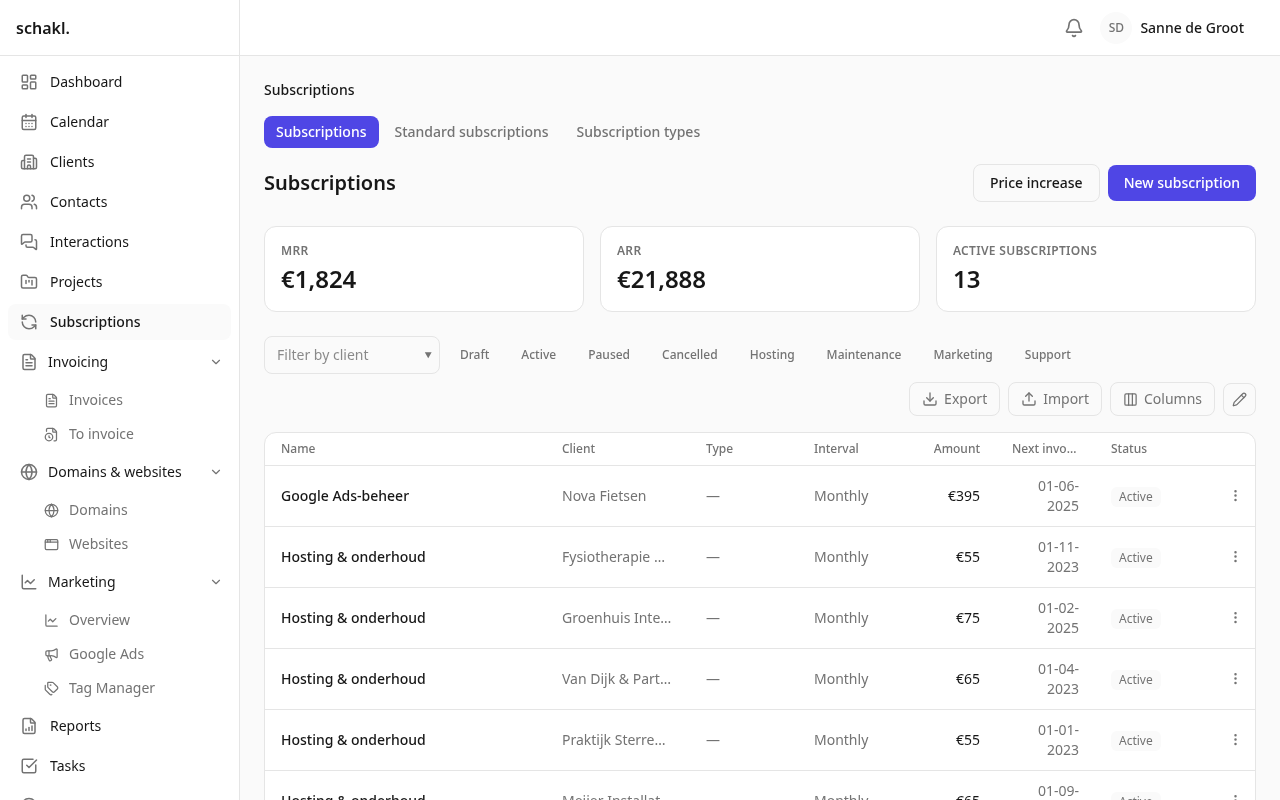
Where to find it
Section titled “Where to find it”Abonnementen (Subscriptions) in the main menu. Tabs above the section lead to the list itself, to Standaardabonnementen (Standard subscriptions) and to Abonnementstypes (Subscription types). You only see those two with the matching manage permissions; Instellingen → Abonnementen (Settings → Subscriptions) leads to the same screen. The client page, the project page and the website page each carry an Abonnementen panel.
The list is sectioned per standard subscription, with the client as the first column; clicking the client opens the subscription, and the client page sits in the ⋯ menu. A Volgende factuur (next invoice) date that has passed is drawn as an overdue deadline, and the Factuurdatum verstreken (invoice date passed) tile opens Nog te factureren narrowed to subscriptions.
At the top of the list sit Maandelijks terugkerende inkomsten (MRR), Jaarlijks terugkerende inkomsten (ARR) and the number of Actieve abonnementen. Below them you filter by client, by status and by your own types.
Creating a subscription
Section titled “Creating a subscription”The quickest way is from the client page: the + on the Abonnementen panel opens the same form in a dialog, with the client already filled in and only this client’s projects offered. After saving you are still on the client page. From the list it goes like this:
- Click Nieuw abonnement (New subscription), optionally after choosing a Vanuit standaardabonnement (From standard subscription), which prefills the form.
- Fill in Naam (Name), Klant (Client) and Type. If the agreement sells something from your price list, pick it under Product: that fills in the name and the amount, and both stay yours to change.
- Set Status (Concept / Actief / Gepauzeerd / Opgezegd, i.e. draft / active / paused / cancelled), Interval (Maandelijks, Per kwartaal, Jaarlijks or Eenmalig), Bedrag (Amount), Inbegrepen uren (Included hours) and the Startdatum (Start date).
- Under Automatisch factureren (Automatic invoicing), choose how far invoicing goes on its own, or leave it on Instelling van de organisatie volgen (follow the organisation setting).
- Under Gekoppelde projecten (Linked projects), link the projects whose hours draw on the bundle.
A new subscription defaults to Actief. Its Volgende factuur (Next invoice) is then derived for you: the first period boundary from the start date that is still ahead, so an agreement that has been running for years does not start with a pile of past periods. Only the edit form shows that date and lets you change it; a date you enter yourself is always honoured.
If it was already invoiced in your previous system, fill in Gefactureerd tot (invoiced until). Periods ending on or before that date are no longer offered anywhere and never created, not by the nightly run either. A subscription that arrives through an import deliberately lands as Concept, so a bulk import never quietly starts billing.
The price has a history
Section titled “The price has a history”Bedrag is not a field you overwrite: every price change adds a row with an effective date. That is what keeps last year’s invoice from being repriced after the fact, and what makes the billing cycle charge the price that applied on the invoice date.
For a round of increases, use Prijsverhoging (Price increase) above the list, or Prijs verhogen in a row’s ⋯ menu. You choose the Aanpassing (add a percentage, add a fixed amount, or set a new amount), an Ingangsdatum (effective date) and the Bereik (scope): all subscriptions, one type, one subscription, or one standard subscription. Optionally the standard subscriptions’ own prices are updated too. You get a Voorbeeld (Preview) first, listing the current and the new amount per subscription; nothing is written until Doorvoeren (Apply). Cancelled subscriptions are skipped, including when you target one directly.
Included hours and projects
Section titled “Included hours and projects”Under Gekoppelde projecten you link the projects the work for this agreement is logged against. That has two consequences:
- The project takes its hours budget from the agreement instead of from its own field. The budget field on the project is then locked and reads “Uren komen van abonnement” (hours come from a subscription). Where several agreements cover the same project, they add up.
- Work on such a project defaults to Niet facturabel (non-billable), because the retainer already pays for it.
A non-monthly agreement is converted to a month: 30 included hours per quarter give the project 10 hours per month, and the budget period becomes monthly. Only active subscriptions with included hours count. On the project page the Abonnementen panel shows how much of the bundle has been used this period and whether you are over it.
The billing cycle
Section titled “The billing cycle”Once a day schakl. checks which active subscriptions have reached their Volgende factuur date. For each one the period is offered up at the price that applied on that date, and the next invoice date moves on by one period. If that date lies several periods back, all of them are caught up in the same run, not one a night. What the run is going to bill is already listed on Nog te factureren beforehand. What happens next depends on Automatisch factureren:
| Level | What happens |
|---|---|
| Uit (Off) | Nothing is created; the period stays outstanding and you add it yourself in the invoice editor. |
| Concept klaarzetten (Prepare a draft) | A draft invoice appears; you check it and send it. |
| Klaarzetten en definitief maken (Prepare and issue) | The invoice also gets its number and due date, but is not e-mailed. |
| Klaarzetten, definitief maken en mailen (Prepare, issue and send) | The invoice goes to the client with its PDF, unreviewed. |
The cycle always advances, including on Uit: a period nobody invoiced stays outstanding and is offered in the invoice editor, so it is never lost. Draft, paused and cancelled agreements do not bill.
Sold once
Section titled “Sold once”A one-off sale (a website build, a logo, a migration) is a subscription with the interval Eenmalig. It has no cycle: it is billed once, on its start date (or today, if that has passed), and it gets everything an agreement has: a standard subscription to start from, a type whose task templates roll out on activation, linked projects, notes with variables and your own fields. The moment an invoice bills it, whether the nightly run drafted it or you picked it in the invoice editor, it moves to Afgerond (completed) by itself. Delete, cancel or fully credit that invoice and it opens again. A one-off agreement never counts towards MRR or ARR.
A standard subscription and an agreement can name the Product from your price list that they sell. That is a record of what is sold, not a link that keeps prices in step: re-pricing the product later changes nothing on the agreement. Under Instellingen → Facturatie, Producten en diensten has an In gebruik (in use) column counting the subscriptions and standard subscriptions that name each product.
In advance or in arrears
Section titled “In advance or in arrears”Which period an invoice covers on its invoice date is called Facturering (billing):
- Vooraf (in advance): the period after the invoice date. Usual for hosting and licences: on 16 May you invoice the year that begins then.
- Achteraf (in arrears): the period before the invoice date. Usual for a retainer billed once the month has been delivered. This is the default.
You set it on the subscription type. A standard subscription may override the type, and a single subscription may choose differently again for itself (“Volg het standaardabonnement of type” makes it follow again), for an agreement made differently with this client. The subscription shows which way it bills, and whether that was set on the subscription itself.
A subscription’s page carries the Gefactureerde termijnen (invoiced periods) panel: which periods are already on an invoice, and on which one.
Linking a subscription to a website
Section titled “Linking a subscription to a website”A hosting agreement keeps a website online, and the website can say which one. Tick Dekt websites (covers websites) on a type (the bundled Hosting type already has it); subscriptions of that type can then be linked to websites of the same client:
- in the subscription form, under Websites, which offers only the chosen client’s websites;
- or on the website page, in the Abonnementen panel: pick one of that client’s running agreements, or create a new one with +, with the client and website already filled in.
The subscription lists the websites it covers under Dekt (covers). Untick the type later and existing links stay until you remove them yourself.
Standard subscriptions and types
Section titled “Standard subscriptions and types”A standaardabonnement (standard subscription) is a preset that prefills the create form, such as “Hosting Basis, € 25 per month, 1 hour included”. You make them on the Standaardabonnementen tab, or you save an existing agreement as one with Opslaan als standaardabonnement in the row’s ⋯ menu. They also record the Opzegtermijn (dagen) (notice period in days). Rename a standard subscription and the subscriptions still carrying that name are renamed with it, and the screen tells you how many; give a subscription its own name and it stops following. Changing a standard subscription’s price never changes the price of an existing subscription.
Abonnementstypes are your own categories (hosting, maintenance, SEO), with a label per language, a position and an active/inactive switch. More importantly, a type carries taaksjablonen bij activatie (task templates on activation). The first time a subscription of that type becomes active, those tasks are created on the client. That happens exactly once per agreement, so pausing and resuming never spawns a second onboarding.
Notes with variables
Section titled “Notes with variables”The Notities (Notes) field understands variables that are stored as tokens and filled in only
when the note is displayed: {{company_name}}, {{subscription_name}}, {{type}}, {{amount}},
{{interval}}, {{included_hours}}, {{start_date}} and {{brand_name}}. While you edit, a
Voorbeeld (Preview) sits under the field. They work in a standard subscription too, where they
are resolved on every subscription that uses it.
Notes are internal by default. Tick Notities op de factuur (notes on the invoice) on a standard
subscription and they print under the lines of every invoice its subscriptions raise, with the
variables filled in at the moment the invoice is made: an amount reads € 25,00, like the rest of
the invoice, and a later price change never rewrites an invoice already sent. A single
subscription can set it differently for itself (Op elke factuur afdrukken, print on every
invoice, or Alleen intern, internal only). Headings, lists, tables and quotes from the editor are
laid out properly on paper.
Permissions
Section titled “Permissions”Set per role under Instellingen → Rollen (Settings → Roles).
| Permission | What it grants | Held by default |
|---|---|---|
subscriptions.subscription.read | View subscriptions | Administrator; Client only its own |
subscriptions.subscription.write | Manage subscriptions | Administrator |
subscriptions.subscription.delete | Delete subscriptions | Administrator |
subscriptions.type.manage | Manage subscription types | Administrator |
subscriptions.template.manage | Manage standard subscriptions | Administrator |
Reading is deliberately not a Member default: what a client pays is commercially sensitive. You can widen it per role. The Client role sees in the portal only its own company’s running subscriptions, with no drafts and none of your internal notes. The Owner role holds everything.
Good to know
Section titled “Good to know”- Deleting a subscription takes its price history and invoice lines with it. If you only want the billing to stop, set the status to Gepauzeerd or Opgezegd; the agreement and its history stay.
- On the client page the Abonnementen panel stays empty for someone without read permission, rather than showing an error.
- Import and export cover three lists: subscriptions (upserted on name), subscription types (on key) and standard subscriptions (on name). Invoice lines and project or task links are deliberately not included. See Import & export.
- Subscriptions is a licensed module: when the licence lapses everything stays readable and exportable, but writing stops.